Modules · For the owner
Context, Policy & Communication
How the work moves
Business context- 1Understand context
- 2Identify interested parties
- 3Set policy
- 4Review when things change
Open: More > Context, Policy & Communication. Typical leads: Quality Manager and Executive. Purpose: maintain the current review of the shop's circumstances, interested parties, policy, and communication.
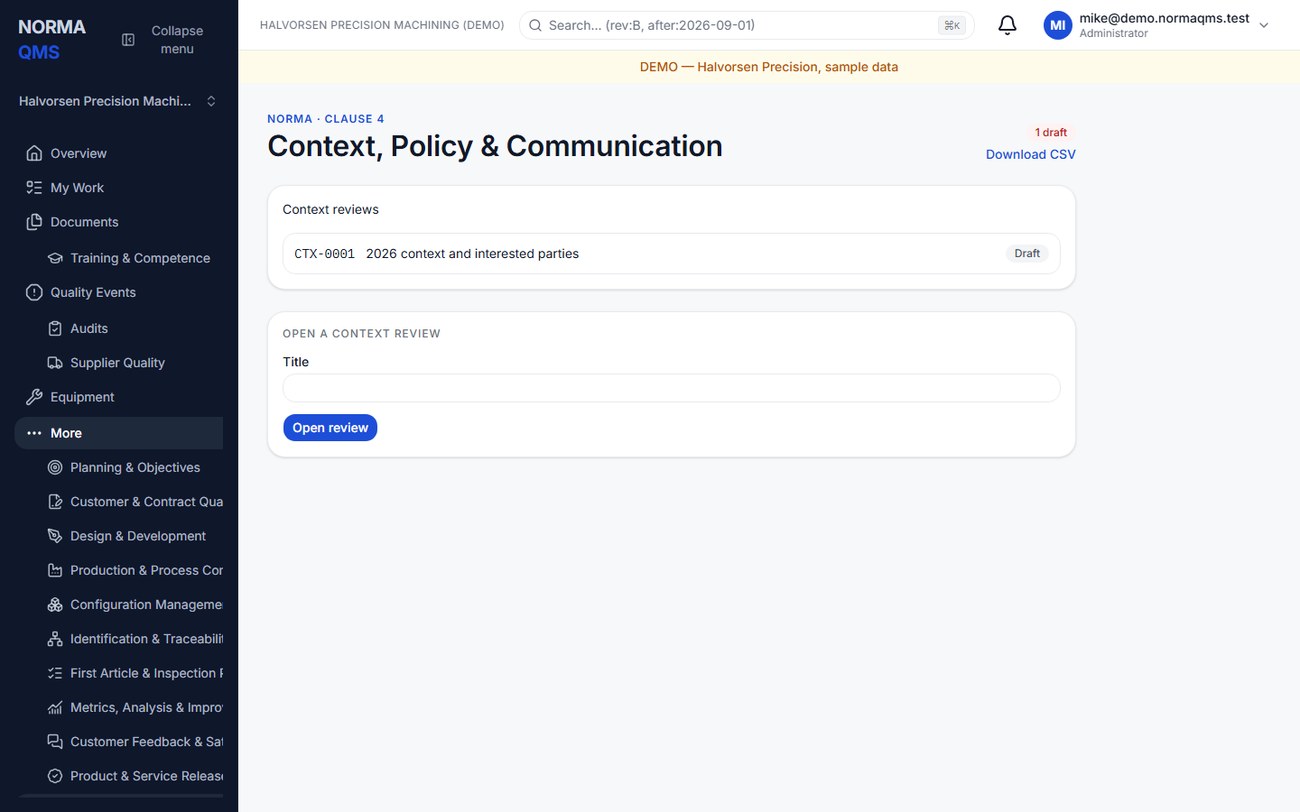
- Choose Open review and enter a title such as “Annual context review 2026.”
- Record internal issues: staffing, equipment, capability, capacity, process stability, and other relevant conditions.
- Record external issues: customer expectations, supplier availability, market changes, and other factors affecting quality.
- Identify interested parties and their relevant needs. Name the actual groups and expectations, not only generic categories.
- Enter the quality policy and how it is communicated. Record a management representative if applicable to your system.
- Review the scope information linked to the effective QMS baseline. Maintain the authoritative boundary in Standards & scope.
- Save the review, inspect the missing-information checklist, then choose Make current when the review is ready.
The new current review supersedes the prior current review. Historical reviews remain available. Use a new review when the company's circumstances change materially rather than silently treating last year's review as today's facts.
Suggested content for a small shop
| Field | Useful example |
|---|---|
| Internal issues | A second shift is starting; two inspectors need training on the new CMM program |
| External issues | A key plating supplier has extended lead times; a new customer requires additional release evidence |
| Interested parties | Customer quality representative expects lot traceability; operators need current instructions at the station |
| Quality policy | Management's actual commitments and how objectives support them |
| Communication | Shift meeting date, briefing method, audience, and location of the current policy |
The module is a current business review. The quality manual is the controlled description of the system. The signed scope establishes the system boundary. Keep these three consistent without duplicating every paragraph in every location.
Completion check: the intended review is Current, the earlier review is Superseded, required sections are populated, and the communication method is specific enough to follow up.
Map your processes
Open: Settings > Processes, or Processes on the Organization page. Every member can read the map; a quality manager or administrator edits it.
The process map lists the processes your shop runs, grouped as Management, Core (the order-to-ship flow) and Support, with the activities under each process and the work centers where they happen.
- On first visit, choose a map under Start from and select Add the starter map. It is a starting point: rename, retire, or add anything afterward. If no map matches your standard, the closest one is offered and the page says so.
- On each process, choose Set owner to name the Process owner, Add activity with a code and a name, and pick the work center for each activity.
- Under Work centers, use Add work center for each cell, line, or area. Under Add a process, add any process the starter map lacks.
- Under Link a record to a process, choose the procedure, audit, or nonconformance and the process it belongs to, then select Link. Choose Clear the link to remove it. Linked records appear on the process card.
- Retire a process or work center you no longer use. A process with active activities, or a work center where an active activity still happens, cannot be retired until those activities move.
Every change is on the record chain. Use Print / Save as PDF when an auditor asks for the process map.
In the user guide
This article is chapter 12, "Context Policy and Communication", of the NormaQMS User Guide (NORMA-UG-001), which is under Help > User guide. Chapter numbers in the text refer to that guide.